
Free ideal customer profile analysis from your won deals
See what the customers you actually win have in common, plus a simple checklist to qualify the next one. Built from deals you closed, not a workshop guess. Connect HubSpot, or upload a CSV from any CRM.
See a sample report made from invented data, before you connect anything.
Connect HubSpot
- Reads your closed-won deals and the companies linked to them.
- Read-only, and only when you ask for a report.
- Open for up to 30 days, then it closes.
How the connection works
- One click. We read your closed-won deals and the companies they’re linked to. Nothing else, and nothing is written back.
- We only read when you ask for a report. Not in between, and never on a schedule.
- Once your report is delivered, the connection stays open for 30 days, counted from the day you connected. Connect again for a new report and the 30 days start again. Re-run your report any time until then; we’ll email you before it closes.
- Disconnect any time, from any of your reports. It ends the connection for your whole HubSpot account.
Connecting needs permission to install apps in HubSpot (usually a super admin). Not you? Forward this page to your HubSpot admin, or upload a CSV.
Upload a CSV
- Nothing connects to your CRM. Names and contact details are stripped from your file before it is analysed.
- Works with any CRM’s export, or a spreadsheet.
- Minimum 10 closed-won deals.
What is a free ICP report?
An ICP report identifies which types of companies you actually win, based on evidence rather than opinion. This free version analyses your closed-won deal data and returns a PDF showing who to target (up to three profiles by industry, company size and location, or honestly none when your data shows no pattern), the weighted qualification checklist, and what is worth knowing in your won deals.
Most companies win with more than one kind of customer, and a single blended “ideal customer” describes none of them accurately. Where your wins split into distinct profiles, the report shows each one and the working; where they do not, it says so.
Derived from your wins, not described from your opinions
Most free ICP tools ask you to describe your ideal customer, then hand your own opinion back with nicer formatting. A template cannot tell you anything you did not type into it.
This report does not ask what you think. It analyses what happened. Which industries, company sizes, regions and lead sources keep appearing in your won column, and how much weight each one genuinely carries. “Industry matters” is a description. “Industry alignment carries 40% of your model’s weight” is a formula your team can act on. If you want the method in full, here is how to analyse your closed-won deals.
You would not build a sales forecast from a brainstorm. Do not build your ICP from one.
What your free ICP report contains
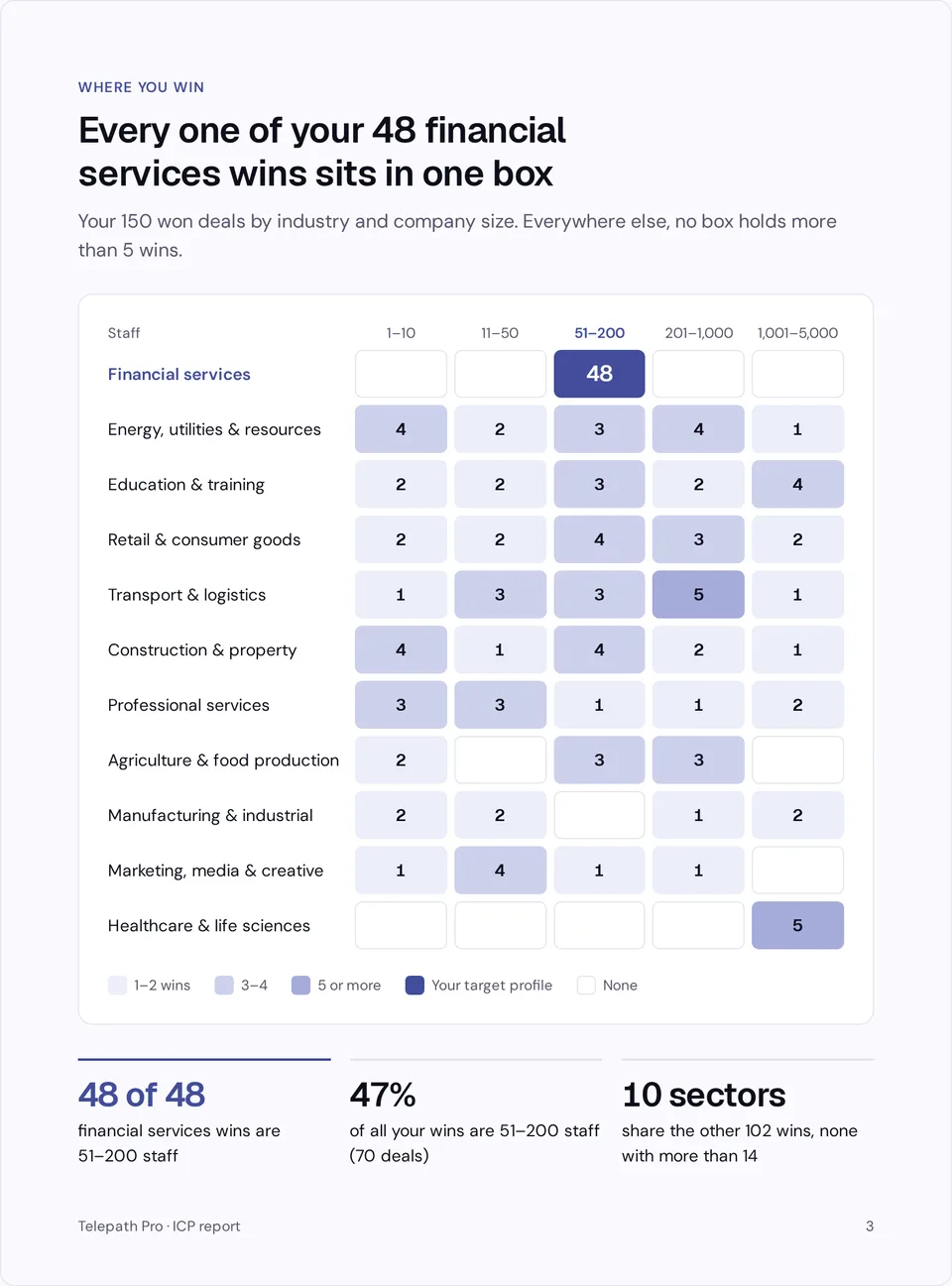
- Your won-deal profile. Where you win by sector and company size, and how your won deals spread across industry, region, deal size and lead source, computed from your data.
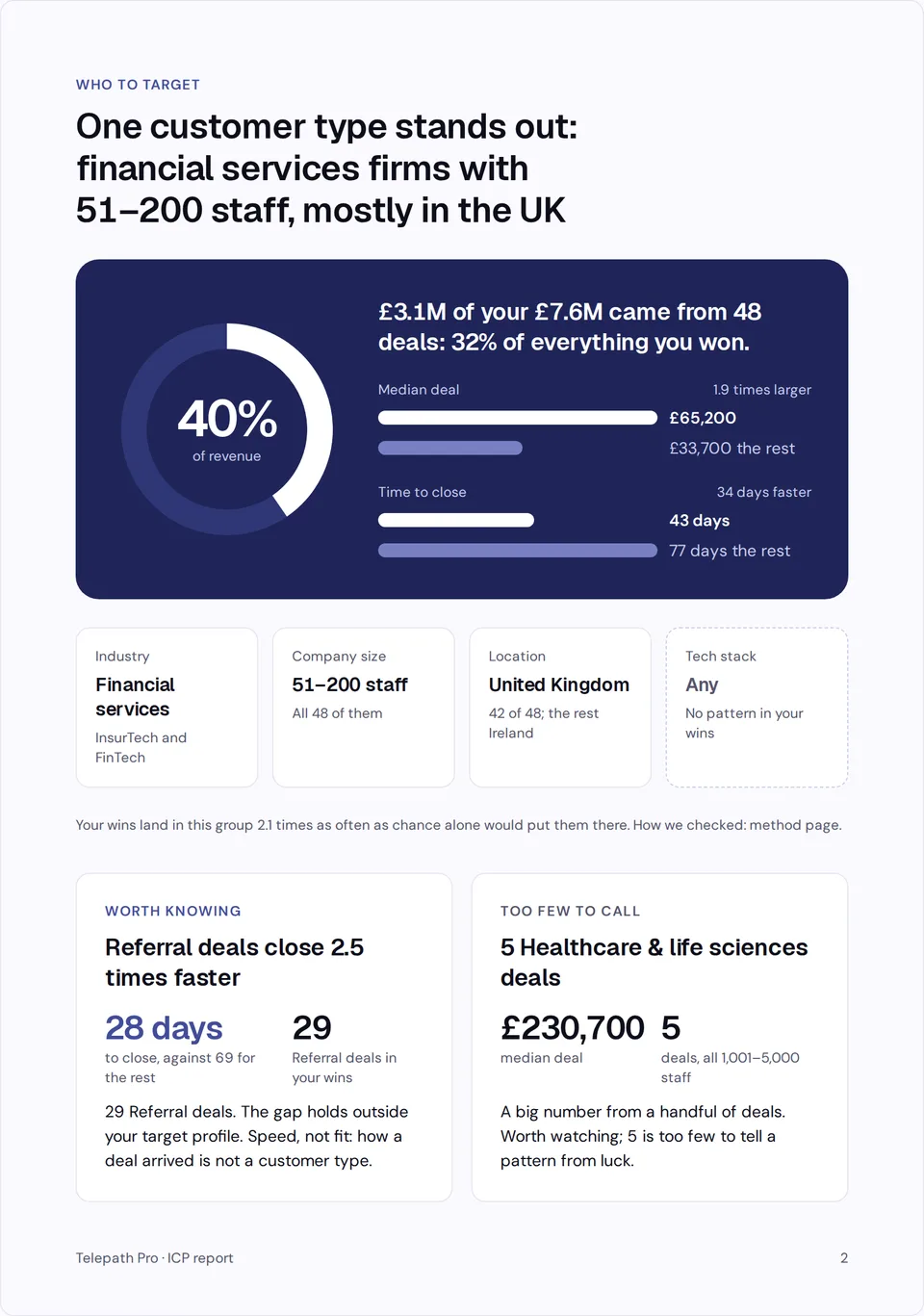
- Who to target. Up to three target profiles, described by industry, company size and location, each one shown only where your won deals are concentrated beyond what chance would give. When no group stands out, the report says so and shows no profile: zero is a valid answer.
- A qualification checklist. Computed in code from your won deals: each attribute is weighted by how concentrated your wins are on it, and an attribute spread about as evenly as chance would give carries no weight. When no attribute stands out, the report says there is no checklist. A starting point for qualifying new deals, not a prediction.
- Worth knowing. Differences in your won deals that beat chance but are not about who to target, such as how deals came in and how fast they closed. Shown only when one passes.
- Too few to call. When a small group shows a big average deal, the report names it and says it is too few to tell a pattern from luck. Shown only when such a group exists.
See what you get
Three pages from a sample report, built from invented deals. Yours is built from the deals you won.

A free ICP analysis that refuses to guess
Every figure in your analysis, and the qualification checklist, is computed from your data in code. The written commentary is written in code from those figures too. No AI model writes any of it.
When your data cannot support a claim, the report says so instead of guessing. Too few deals in a group for a pattern to be statistically real? The report states that plainly rather than papering over it with confident nonsense. Below 10 closed-won deals, the tool will tell you the analysis cannot run yet.
Being told what your data cannot prove is what lets you trust the parts it does.
Your customer data, handled like it matters
You are uploading your customer list. This flow was built to deserve it.
- Personal columns we detect are removed on our server before analysis begins. Columns with names, email addresses and phone numbers are detected and removed automatically on our server before analysis begins. Values that look like personal details in other columns are removed too.
- Company names are removed too. We analyse the shape of your wins, not the names in them.
- You see exactly what was removed. The column check reports which fields were stripped before anything runs.
- No account required. No credit card, no trial, no sales call standing between you and the report.
- Encrypted in transit. Every connection over enforced HTTPS.
- Never sold, never used to train AI models for anyone else. Your data builds your report. Nothing else.
How to get an ICP report from HubSpot data
- Export your closed-won deals. In HubSpot: Deals, filter Closed Won, Export as CSV. Any CRM export works, and a spreadsheet is fine too. Minimum 10 closed-won deals, whether you upload a CSV or connect HubSpot; 30 to 500 gives the sharpest results.
- Upload and review. Columns are auto-detected and you are shown exactly what will be analysed and what was stripped.
- Enter your email. That is where the PDF goes. One report per email per week, because this is a real analysis, not a toy.
- Receive your report. Usually within a few minutes.
Who this is for
Built for B2B founders, sales leaders and RevOps teams with at least 10 closed-won deals who want their ICP derived from evidence rather than asserted in an offsite. If you use HubSpot, the export takes two minutes; any CRM that exports a CSV works identically. Under 10 won deals? The report will not run yet: the patterns are not statistically real, and the tool says so rather than guessing.
The free report is a one-time snapshot. Telepath Pro is for HubSpot users only. If you want every open deal assessed against your ICP inside HubSpot, with Telepath telling you when that ICP has moved so you decide when to refit, that is what Telepath Pro does. If you are weighing up the category rather than this report, the ideal customer profile software page sets out what such tools do and where Telepath sits among them.
Built by someone who carried a number
Telepath Pro is built by a founder with twenty years in B2B sales. This free report exists because every ICP document I was ever handed was a slide from a strategy offsite, describing a market that no longer existed. This one is built from what your team actually closed.
Free ICP report FAQs
Is the ICP report really free?
Yes. There is no account, no credit card and no trial that quietly becomes a subscription. You upload a CSV and receive a PDF report by email.
How do I get a free ICP report from HubSpot?
Two ways. Connect HubSpot and we read your closed-won deals, plus the companies those deals are linked to, read-only, and only at the moment you ask for a report. We never write anything to your CRM and we never read your open pipeline. Once your report is delivered, the connection stays open for 30 days, counted from the day you connected. Connect again for a new report and the 30 days start again. You can re-run the report until then, we’ll email you two days before it closes, and you can disconnect any time from any of your reports, which ends the connection for your whole HubSpot account. Or upload a CSV (Deals, filter Closed Won, Export), which connects nothing at all. Both routes produce the same report. If you later move to a paid plan, Telepath asks for more: it reads your open deals too, and writes the fit score back onto each deal in HubSpot. That is a separate consent screen; the free report never writes to your CRM.
Is this an AI ICP generator?
Yes, with one important difference from most tools using that name. Typical AI ICP generators ask you to describe your ideal customer and then format your description. This one derives the profile from your closed-won deal data: the profile and the qualification checklist are computed in code from deals you actually closed.
What data does the ICP report need?
Whatever your CRM exports. The analysis is strongest with industry, company size, region, deal value and lead source columns, and it adapts to whatever you have, telling you what is missing rather than guessing around gaps.
What happens to my uploaded data?
Personal contact columns (names, emails, phone numbers) are detected and stripped automatically before analysis, and the column check shows you exactly which fields were removed. Company names are removed too; the analysis works on the shape of your wins, not the names in them. Your data is never sold and we never use it to train AI models for anyone else.
How many deals do I need for an ICP analysis?
A minimum of 10 closed-won deals, whether you upload a CSV or connect HubSpot; between 30 and 500 gives the sharpest results. If you upload more than 500, the most recent 500 by close date are analysed. Below roughly 50 deals, treat the output as directional; the report itself flags where the sample is thin.
How is this different from HubSpot’s free ICP template?
HubSpot’s free ICP resources are templates and worksheets you complete with your own descriptions, and they are good at that job. This report is generated from your closed-won deal data instead: the profile and the qualification checklist are computed in code from what you actually closed, not written down in a workshop.
Can I use this if I do not use HubSpot?
Yes. Any CRM export or spreadsheet of won deals works. The column auto-detect handles Salesforce, Pipedrive and generic CSV formats.